
Ultimate Guide to Choosing the Right Laptop Charger in Kenya
Share
..When your laptop’s battery starts dropping faster than usual or you suddenly realise you’ve lost the charger, one question looms large: which replacement charger is the right one? For laptop users in Kenya, with brands like HP, Lenovo, Dell and others circulating widely, selecting the correct charger — with the correct pin type, voltage, wattage and quality — is crucial for safe and reliable use.
In this guide we’ll walk through the main pin types you’ll encounter in Kenyan laptop chargers, how to identify them, what to watch out for, and why ordering from a trusted vendor such as Suncom Ltd (see their laptop & charger collection here ) can save you from headaches. (SunCom Limited)
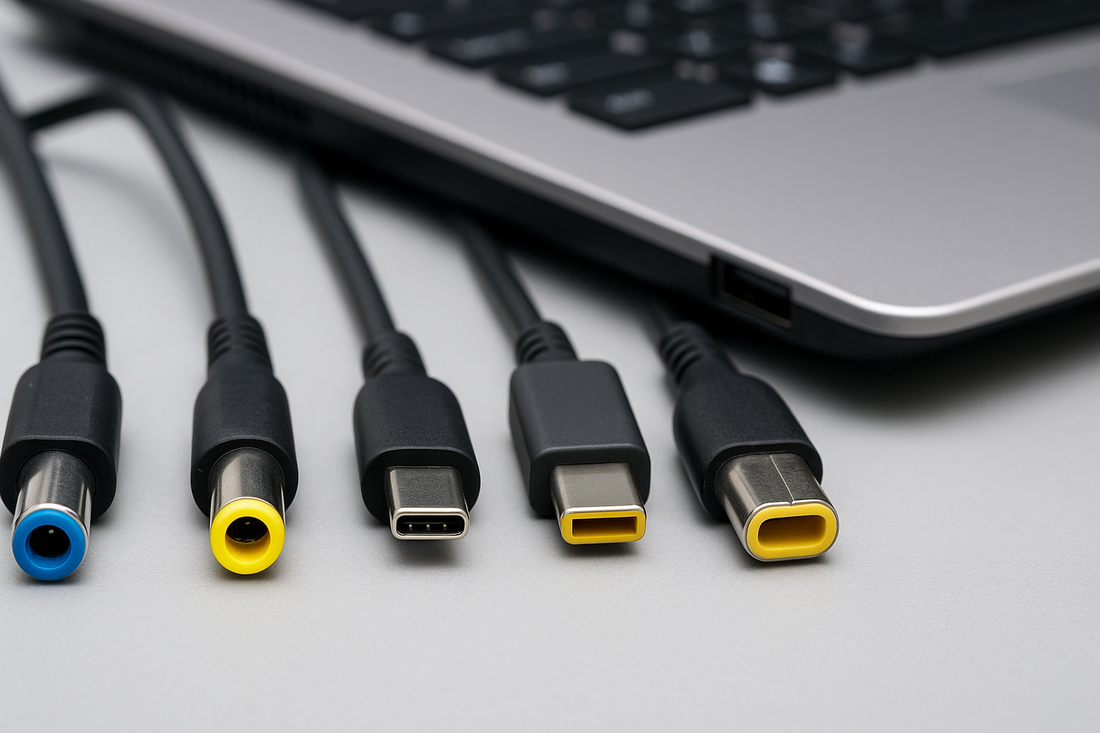
Whether you’re shopping for a Blue Pin charger, Yellow Pin, USB-C, Lenovo Yellow Pin or a Dell Pin model — make sure you read this first.
Why the Right Charger Matters
Using a wrong or poor-quality charger can lead to a host of issues: slower charging, overheating, unreliable power delivery, potential damage to your laptop’s battery, and in worst cases, dangers like short-circuits or fire. Hence:
-
Compatibility: The charger must match your laptop’s required voltage and current (for example 19.5 V, 3.33 A).
-
Pin type: Different brands use different connector shapes/pins. The wrong pin simply won’t fit.
-
Wattage: A charger with too low wattage may struggle; too high and if quality is poor, it might stress the laptop.
-
Quality & safety: Authentic parts, proper surge/overheat protection, certified vendor. Suncom Ltd emphasises “authenticity guarantee” in its accessories section. (SunCom Limited)
By investing in the correct and quality charger you preserve your laptop’s lifespan, enjoy reliable performance and avoid unnecessary downtime.
Understanding Pin Types in Laptop Chargers
Here are the common pin types you’ll see in Kenya and what they generally correspond to.
1. Blue Pin Charger
The “Blue Pin” charger usually refers to a barrel-type connector with a blue tip commonly used in certain HP and Dell laptops. For example, the Suncom site lists “HP/Dell Blue Pin Laptop Charger … 65W AC Adapter 4.5×3.0mm”. (SunCom Limited)
Key points for Blue Pin:
-
Tip size often ~4.5×3.0 mm (varies by model)
-
Wattage around 65W common for mid-spec laptops
-
Look for original or high-quality replacements
-
Ensure the voltage matches your laptop’s requirement (19.5V etc)
2. Yellow Pin Charger
The “Yellow Pin” is found mainly in HP laptops (especially older models) and sometimes other brands. Suncom lists “Original Quality HP Yellow Pin Laptop Charger” among its collection. (SunCom Limited)
What to check for Yellow Pin:
-
Barrel tip with yellow plastic ring (alert: visually distinctive)
-
Often used on HP Envy, ProBook, Pavilion series
-
Match your laptop’s label: voltage, current, wattage
-
If you’re seeing yellow inside the tip of your old charger, you likely need this type
3. Type-C (USB-C) Laptop Charger
The modern era: USB-C (also known as Type-C) chargers now power many laptops — including ultrabooks, newer Lenovo, Dell, HP, MacBooks (in Kenya too). Type-C’s advantage: reversible connector, also supports data, video, power delivery (PD) too. Suncom offers “Lenovo 65W USB-C Charger” in their collection. (SunCom Limited)
Important for USB-C:
-
Ensure it supports USB-C Power Delivery (PD) with the wattage your laptop needs (often 45W, 65W, 90W or more)
-
Check that your laptop supports USB-C charging (some older models have barrel only)
-
Good for portability and future-proofing
-
Beware cheap USB-C chargers that don’t regulate properly or deliver claimed wattage
4. Lenovo Yellow Pin
Some Lenovo models use a “Yellow Pin” barrel connector (similar visually to HP’s) or a specific Lenovo proprietary tip. If you have a Lenovo laptop and the original charger has a yellow-ring tip, you’ll want this type. The Suncom catalogue mentions “Lenovo 65W USB-C Charger” but for barrel types you may still find yellow pin versions elsewhere. (SunCom Limited)
Tips for Lenovo Yellow Pin:
-
Double-check your laptop’s model and required wattage and voltage
-
Look for compatibility with ThinkPad, Yoga, IdeaPad lines (some accept USB-C but others use barrel)
-
Use original or high-quality aftermarket parts
5. Dell Pin Chargers
Dell uses several connector types: large barrel tips (sometimes known as “Dell big pin”), small pin (4.5×3.0 mm), and increasingly USB-C. For example, Jumia Kenya lists “Dell Small Pin Laptop Charger 19.5V, 3.34A 65W (4.5×3.0mm)” in its listings.
Points for Dell pins:
-
Match the original charger’s tip size and specs
-
Dell laptops often require 19.5 V or 20 V, with current dependent on wattage
-
When buying replacements, check for Dell compatible marking or specs
-
For newer Dell XPS/Latitude models, you might be able to use USB-C instead
How to Choose the Right Laptop Charger – Step by Step
Here’s a practical step-by-step selection checklist:
-
Check the original charger’s label: Look at your existing charger (if you still have it) for voltage (e.g. 19.5V), current (e.g. 3.33A), wattage (often computed as V×A ≈ W). For example: 19.5V × 3.33A ≈ 65W.
-
Identify the connector/pin type: Is the tip barrel with blue ring, yellow ring, is it USB-C, or some other proprietary shape?
-
Confirm your laptop model’s requirements: Sometimes the laptop’s underside label or manual will say “Adapter: 19.5V 4.62A (90W)”.
-
Select matching wattage or higher: Using a charger with slightly higher wattage (e.g. 90W instead of 65W) is usually okay if quality is good — the laptop will draw what it needs. But never less wattage than required.
-
Check reference vendor and authenticity: Buy from a trusted local retailer like Suncom Ltd [see their charger collection here] (https://suncomltd.com/collections/chargers-cables?
-
Look for safety certifications: Over-current, over-voltage protection, good build quality.
-
Check cable length and plug type: In Kenya you’ll likely want a 3-pin UK plug or appropriate adaptor.
-
Warranty / return policy: A retailer that offers clear returns and warranties is better. Suncom promotes customer support, authenticity guarantee. (SunCom Limited)
Why Shop with Suncom Ltd for Laptop Chargers
Choosing where to buy is as important as what you buy. Suncom Ltd offers:
-
A dedicated category for “Chargers & Cables” on their site, indicating good stock and selection. (SunCom Limited)
-
A focus on authenticity and reliability of accessories. For example in their blog they emphasise “authenticity guarantee” and mention same-day delivery in Nairobi. (SunCom Limited)
-
Local Kenyan e-commerce presence (thus easier shipping, return process, local currency pricing).
-
A range covering laptop chargers (barrel types, USB-C), cables and accessories — meaning one stop shopping.
If you click through to their collection you’ll find items like: “HP/Dell Blue Pin Laptop Charger … 65W AC Adapter 4.5×3.0mm – Suncom” listed. (SunCom Limited)
Common Mistakes & How to Avoid Them
Here are mistakes people often make — and how to steer clear:
-
Buying a charger with wrong tip size: Even if the specs (voltage/amp) match, if the connector doesn’t physically fit the laptop, it won’t work. Always verify tip.
-
Choosing too low wattage: A 45W charger might physically power the laptop but will be under strain, possibly overheat and degrade faster.
-
Cheap no-name charger without certifications: A charger lacking proper protection can damage your laptop, or worse. Always consider build quality and vendor reputation.
-
Assuming USB-C works on all laptops: Many older models do not support USB-C charging; they may require a barrel connector. So just because you see USB-C everywhere doesn’t mean your laptop is compatible.
-
Wrong voltage: For example using 18.5V when the laptop requires 19.5V can lead to under-powering or instability.
-
Ignoring cable/plug standards: Buying a charger from abroad may mean the plug doesn’t match Kenyan sockets (3-pin UK) or the cable may be short/inferior.
Charger Type & Use Case Guide Table
| Pin Type | Typical Brands/Models | Wattage Range | Best Use Case / Notes |
|---|---|---|---|
| Blue Pin (barrel) | HP, Dell (certain older Latitude/Pro) | ~65W | Mid-range laptops with 4.5×3.0mm barrel tip |
| Yellow Pin (barrel) | HP (ProBook, Pavilion) | 65W, 90W, etc | Identify via yellow ring on tip; check specs |
| USB-C (Type-C) | Modern Lenovo, Dell XPS/Latitude, HP | 45W-120W+ | Portable laptops; supports PD/fast charging |
| Lenovo Yellow Pin | Some Lenovo ThinkPad/IdeaPad lines | 65W etc | Specific to certain Lenovo models; verify connector |
| Dell Pin (barrel or USB-C) | Dell Latitude, Inspiron, etc | 65W, 90W, 130W | Many variants; check original charger label |
How to Maintain Your Charger & Extend Lifespan
Once you’ve got the right charger, treat it well to maximise lifespan:
-
Avoid bending the cable near the tip; invest in a cable saver or strap the cable neatly.
-
Keep the charger and cable off the floor or heavy traffic areas to avoid being tripped over/pulled.
-
If the charger gets hot to the touch, ensure proper ventilation (don’t cover it with books/soft surfaces).
-
Disconnect when fully charged if possible — keeping it plugged in 24/7 can degrade both battery and charger over time.
-
Use a surge-protected power strip or UPS if your location has unstable power to avoid damage from spikes.
-
Periodically inspect the cable and tip; fraying or exposed wires are a sign to replace immediately.
Frequently Asked Questions (FAQs)
Q: Can I use a higher-wattage charger than my laptop requires?
A: Yes — generally safe if the charger is quality. The laptop will draw only what it needs. For example, using a 90W charger on a laptop that originally had 65W is fine. Using a lower-wattage charger is riskier.
Q: If I have USB-C charging on my laptop, is barrel connector still valid?
A: You’ll need to consult your laptop’s model specs. Some laptops support both USB-C and barrel; others only one. Check the original charger or manufacturer’s manual.
Q: Does the pin colour (blue/yellow) always indicate brand?
A: Not entirely — while blue-ring and yellow-ring barrel tips are commonly used by certain brands (HP, Dell), always verify the exact tip size and specs rather than relying just on colour.
Q: How do I know the charger is original?
A: Genuine chargers have manufacturer branding, correct voltage/current listed clearly, proper certifications and build quality. Buying from credible vendors (e.g., Suncom Ltd) increases your chances of authenticity.
Q: My laptop is slow when plugged in with a replacement charger — why?
A: Potential reasons: the charger may be under-wattage, the cable may have high resistance, the tip may not be fully seated or heating may cause throttling. Try a quality charger that matches original specs.
Summary & Final Thoughts
Choosing the right laptop charger need not be a stressful experience. By following the steps above — checking your laptop’s requirements, verifying tip type (Blue Pin, Yellow Pin, USB-C, etc), selecting a trusted vendor such as Suncom Ltd and taking care of your charger — you’ll ensure reliable performance and extend the life of your laptop.
-
For older HP/Dell barrel-tip laptops the Blue Pin and Yellow Pin remain common.
-
For Lenovo models check carefully whether you have a barrel or USB-C input; the Lenovo Yellow Pin may still apply.
-
USB-C is the forward-looking option for newer machines and offers convenience and future-proofing.
-
Always match or exceed wattage, ensure correct voltage and tip size, invest in quality.
If you’re ready to buy, visit Suncom Ltd’s dedicated charger and cable collection at SuncomLtd.com – Chargers & Cables to explore their available stock. (SunCom Limited)
Here’s to uninterrupted power and a laptop that runs at its best!